Toolknowledge6mo ago

Kortex for NotebookLM review

A Chrome extension that bolts import/export, folders, a prompt library and bulk tools onto Google NotebookLM — the power-user layer NotebookLM doesn't ship with.

Maker
Yaksh Gandhi
Launched
Dec 9, 2025
Pricing
freemium
Visit official site
Kortex for NotebookLM — real sample output
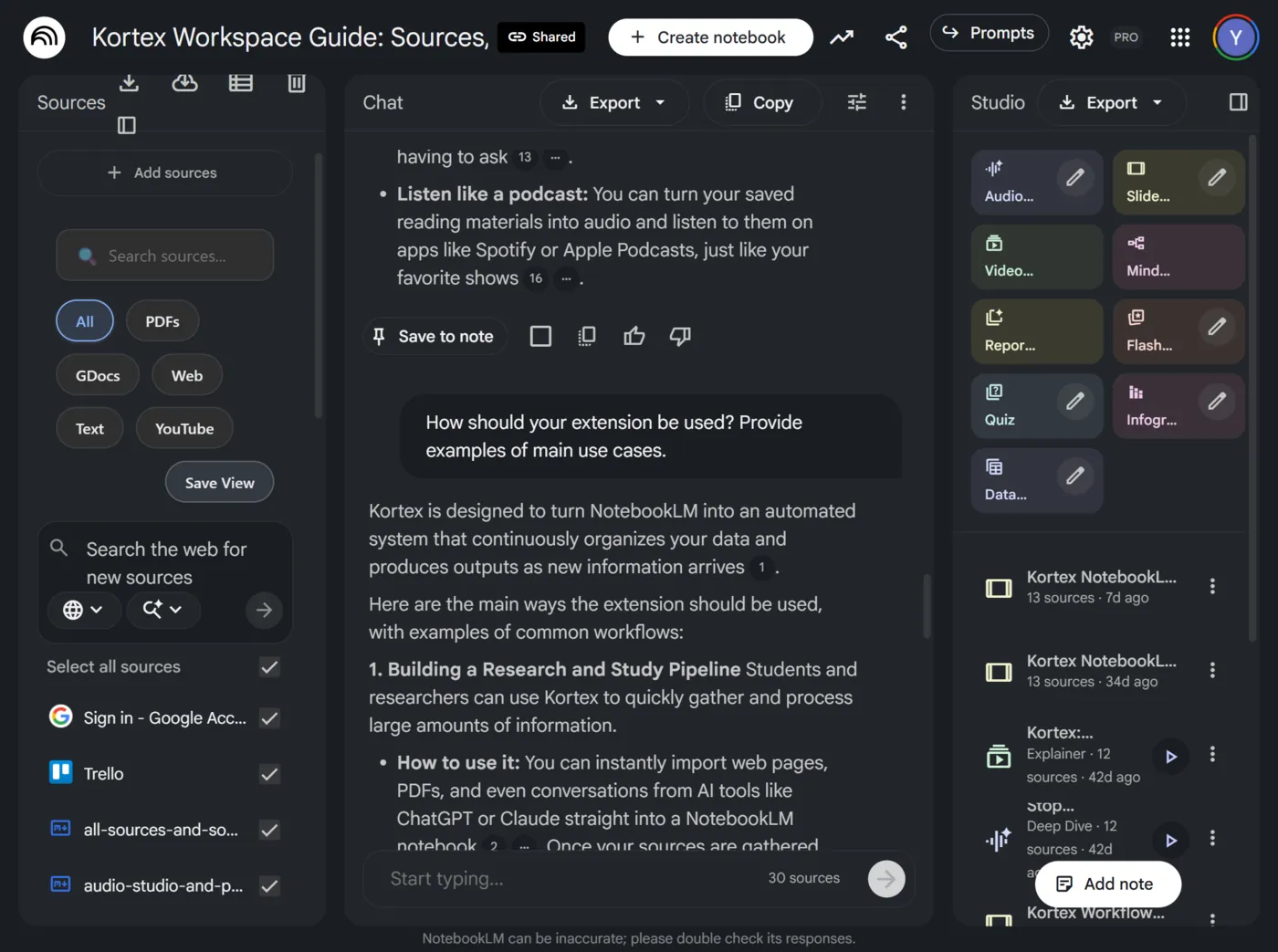
Kortex running inside Google NotebookLM: it adds web/PDF/YouTube source capture, folders, export and a prompt library to NotebookLM's own sidebar. Source: kortex-notebooklm.com.
Firstlook

Our verdict

Google's NotebookLM is brilliant but walled-off — getting sources in and out, organizing them, or reusing prompts is clumsy by design. Kortex is the missing power-user layer that fixes exactly those gaps. If you live in NotebookLM, it's close to essential; if you dip in occasionally, the free tier (or NotebookLM on its own) is plenty.

First look — our read from the docs and sources below; not yet hands-on tested.

If you've used Google's NotebookLM for any serious research, you already know its split personality: the AI is genuinely good, and everything around it is frustrating. Sources are tedious to add in bulk, there's no real folder structure, you can't save a prompt you reuse twenty times a week, and getting your work back out feels deliberately discouraged. Kortex is a Chrome extension built squarely at that frustration.

It doesn't replace NotebookLM — it grafts onto it. Install it and a set of tools appears inside NotebookLM's own sidebar: bulk-import web pages, PDFs, YouTube videos and social posts as sources; export chats and notes; nest notebooks in folders; and keep a library of reusable prompts. The screenshot above is the actual product — note that it's NotebookLM's interface, with Kortex's source-capture and export controls slotted in.

The reception backs up the pitch. On the Chrome Web Store it's at 100,000 users and 4.8 stars across 328 ratings, and it was last updated two days before this review — this is an actively, almost frantically, maintained product, not a launch-and-abandon extension.

Who it's for

NotebookLM power users and researchers — anyone whose day involves pulling lots of sources into NotebookLM, organizing them, and getting summaries back out. For that person, Kortex closes most of NotebookLM's day-to-day annoyances, and the price (a few dollars a month, or $99 once) is easy math.

Who should skip it

If you open NotebookLM occasionally, the free tier or plain NotebookLM is enough — don't pay for power you won't use. And if you don't use NotebookLM at all, there's nothing here for you; start with NotebookLM itself, or a broader tool like Obsidian or Notion.

One honest caveat: this is a first look, not a long-term hands-on test, so I'm not scoring it. Two things to weigh yourself — it's a third-party extension with access to your NotebookLM data (a permissions decision only you can make), and its pricing visibly shifts, so confirm the current plan before buying.

Specs & key facts

What it isChrome / Chromium extension for Google NotebookLM[src]
Users100,000 (Chrome Web Store)[src]
Rating4.8 / 5 · 328 ratings[src]
MaintenanceLast updated Jun 24, 2026 — actively developed[src]
Core featuresSource import/export, web + PDF + YouTube capture, folders, prompt library, bulk tools, automation[src]
StorageLocal on Free · cloud sync on Pro[src]
LaunchedDec 9, 2025 (Product Hunt #5 of the day)[src]

How to use it

  1. 1Install Kortex-NotebookLM from the Chrome Web Store (Chrome or any Chromium browser).
  2. 2Open Google NotebookLM — Kortex injects its tools straight into NotebookLM's own sidebar.
  3. 3Use it to import web pages, PDFs, YouTube and social content as sources, and to export chats and notes back out.
  4. 4Organize notebooks with folders and tags, and save reusable prompts to the prompt library.
  5. 5Start on Free; upgrade to Pro only once you hit the import/prompt caps or need cloud sync and bulk tools.

Pricing

Free

$0

10 prompts across 3 folders, 5 Source View saves per notebook, 5 daily social imports, Smart Search and Highlight & Snipe. Local storage only — no cloud sync, automation or bulk tools.

Pro

$3.75/mobilled $45/year

Unlimited prompts, folders and imports; Cloud Sync; 8 automation pipelines; podcast feed; bulk import & generation; Google Docs Sync.

Lifetime Pro

$99 one-timelisted 50% off from $199

Everything in Pro, forever — no subscription, all future features, beta access, priority support.

Teams

$12/seat/momin. 3 seats, billed annually

Everything in Pro plus shared prompt libraries, team notebooks and an admin dashboard. Enterprise (SSO, centralized billing) is custom-priced.

Pricing as listed on kortex-notebooklm.com on 2026-06-26 — this tool reprices often, so confirm on the official pricing page before buying.

Pros & cons

Pros

  • Fixes NotebookLM's real pain points: bulk import/export, folders, and reusable prompts.
  • Genuinely useful free tier; you only pay once NotebookLM is a daily habit.
  • Popular and actively maintained — 100k users, 4.8★, last updated days ago.
  • Lives inside NotebookLM's own UI, so there's almost no learning curve.

Cons

  • Only useful if you actually use Google NotebookLM — it's an add-on, not a standalone app.
  • A third-party extension touching your NotebookLM data is a trust/permissions decision worth weighing.
  • Pricing and tier limits change often, so the plan you buy may not match next month's.
  • Free-tier caps (prompts, imports, source views) are tight once you rely on it.

Alternatives

FAQ

Sources

Sources

  1. 1.What it does + full live pricing tiers + feature list + user/trust claimshttps://www.kortex-notebooklm.com/Verified 2026-06-26
  2. 2.100,000 users · 4.8★ (328 ratings) · last updated Jun 24 2026 · developer Yaksh Gandhihttps://chromewebstore.google.com/detail/kortex-notebooklm/hdapplggdhndkblofffknpmnnnnbncbnVerified 2026-06-26
  3. 3.Launch date Dec 9 2025 (Product Hunt #5 of the day) + taglinehttps://www.producthunt.com/products/kortex-2Verified 2026-06-26

More coverage

News & first-looks about this release. Coming soon.
Head-to-head comparisons. Coming soon.